Packets: |
The ESE116 Packet-Based Network Simulator ESE 116 Spring 2008, Homework 3 |
Extra office hours will be held on Wednesday, Feb 27 2008 in Moore 207
The official time will be 7:00-9:00pm but we will try to stay as long as possible based on demand
Important Note: The maximum number of times that you can call receive_packet() for a single message is 32760 times.
For almost everyone this should not be a problem, however if your algorithm is exorbantly inefficient, you must respect this condition.
The following tutorials and labs are required reading before starting this hw assignment.
Without first understanding this material, this homework will make little sense.
Also, although not required, the following is highly recmmended:
In computer networking, a packet is a formatted block of data carried by a packet based computer network. Computer communications links such as traditional Point-to-point telecommunications links, simply transmit data as a series of bytes, characters, or bits alone.. However, when data is formatted into a packet, the network can transmit long messages more efficiently and reliably, while simultaneously sharing the network with other connections.
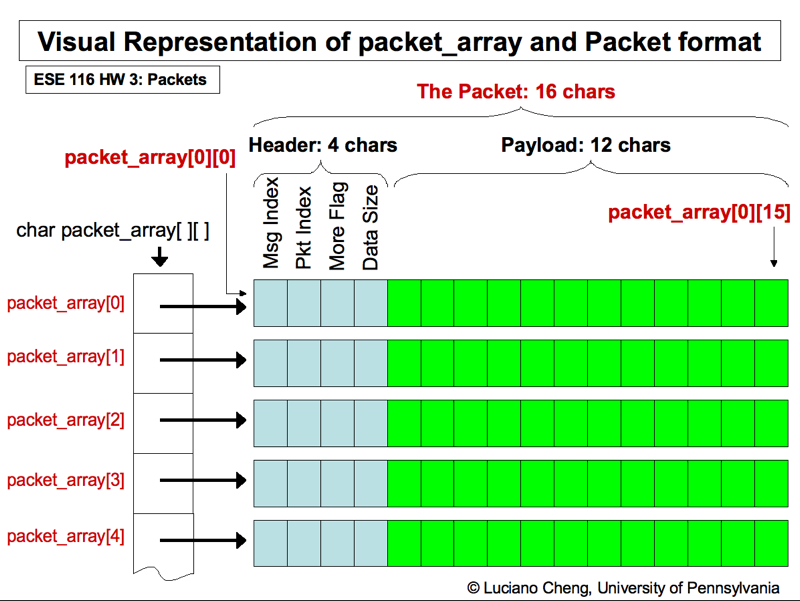
In this assignment you will be creating a packet encoder and corresponding decoder. The encoder will take a message stored as an array of characters, and encode it into a series of packets. The decoder will receive these packets, and reconstruct the message. Instead of using an actual network, we will be simulating a network by randomizing the packet order and creating packet duplicates between when the encoder and decoder is called.
We will be using char arrays of size 16 as our packets. Detailed formatting information is included in the README portion of the packets.c source file.
Make sure you read the README at the top of the packets.c file before beginning this assignment
Detailed function descriptions are in the function headers in packets.c, please fill out the functions according to the specifications.
The file packets.c contains three functions that you will have to complete:
Important Note: In the function receive_message(), you will have to make several calls to the receive_packet() function, which has a return type of char*. A char* is a pointer, or a variable that contains the address of another variable. For the purposes of this homework, a char* will never 'point' to anything but a character array, a char[]. Therefore, the char* returned by receive_message() can itself be accessed like an array.
Eg, the following piece of code would be valid, since receive_packet() returns a char* that points to an array of type char[]
	char* result = receive_packet();
  	char test_char;

	result[0] = 'a';
	result[1] = 'b';
  	test_char = result[0];
	result[2] = test_char;
To open your code in emacs after downloading it, use the '&' to keep the terminal running while running EMACS
emacs packets.c &
To compile your code to a binary executable called 'skynet', type in the following at the command line, assuming your skynet.c and skynet.h files are in your current working directory:
gcc -Wall packets.c -o packets
The '-Wall' flag will print out all warnings that the compilation generates. It is highly recommended that you eliminate warnings in your coding, as warnings can often lead to undefined behavior in your programs.
After executing the code above, the following line can be used to execute your program:
./packets
We have also included some sample output from a working version of the program to demonstrate how your program should operate once completed.
To kill the foreground process in the terminal, hit (CTRL+C). This might come in handy if you need to kill a program you are testing.